Snack Box Vector Dieline Template and 3D: A Guide for Custom Packaging Design
In today’s fast-paced world, having a unique product presentation can make all the difference. Whether you're a small business owner launching your own snack line or a creative DIY enthusiast looking to design custom packaging, the Snack Box Vector Dieline Template and 3D render offers a powerful solution. These templates are not only practical but also incredibly versatile, allowing users to bring their ideas to life with precision and ease.
What Is a Snack Box Vector Dieline Template?
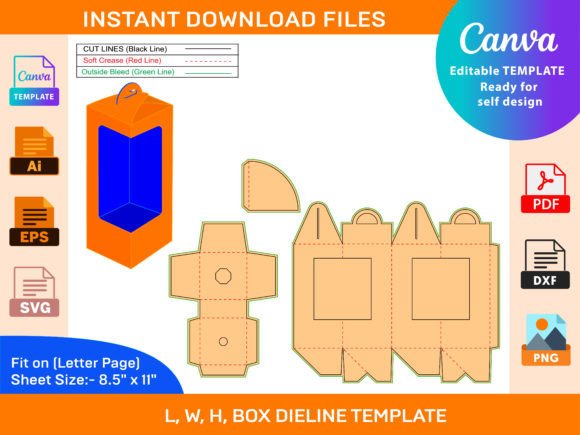
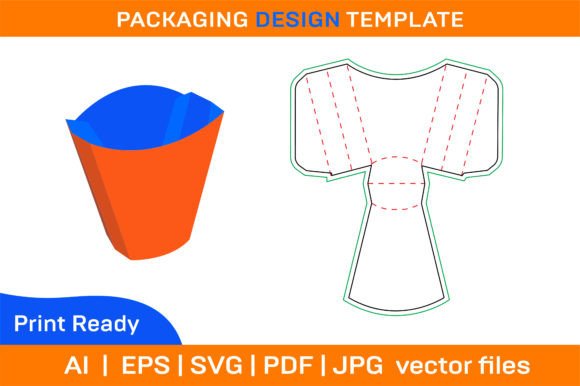
A dieline template is essentially a blueprint that outlines how a flat sheet of material folds into a three-dimensional box. The Snack Box Vector Dieline Template is a digital version of this blueprint, created using vector graphics. This means it's made up of lines and curves defined by mathematical equations rather than pixels, ensuring that it remains sharp and clear at any size when printed.
The template includes both color and blank versions, giving users the flexibility to either print directly from the provided design or add their own branding, artwork, and colors. It is ideal for those who want full control over their packaging aesthetics while maintaining professional quality.
Why Use a 3D Render Version?
The 3D render component of the template allows designers and creators to visualize their final product before printing. By seeing a realistic preview of the folded box, they can better understand how the layout will appear in real life. This is especially useful when working on intricate designs or when planning for specific dimensions and structural elements.
With a 3D render, users can test different scenarios such as:
- How images will wrap around the box
- Where text placement looks most natural
- If the folding mechanism works correctly
This feature helps avoid costly mistakes and ensures that the final printed product matches the intended vision.
Features and Benefits of the Template
The Snack Box Vector Dieline Template and 3D render come with several key features that enhance usability and adaptability:
- Resizable and Editable: The template can be adjusted to fit various sizes of paper boxes, making it suitable for multiple types of snacks or products.
- Printable Formats: Files are available in SVG, PDF, EPS, and AI formats, which are widely supported across graphic design software.
- High-Resolution Quality: All files are optimized for high-resolution printing at 300 dpi, ensuring crisp and clean results every time.
- Compatibility: Works seamlessly with Adobe Photoshop, Illustrator, Silhouette Studio, Cricut Design Space, AutoCAD, and other popular design tools.
- Instant Download: After purchase, users receive immediate access to the ZIP archive containing all necessary files, so there's no waiting for delivery.
Who Can Benefit from Using This Template?
Anyone involved in product packaging, whether professionally or as a hobby, can benefit from the Snack Box Vector Dieline Template and 3D render. Here are some examples of who might find it useful:
- Business Owners: Entrepreneurs selling snacks online or through retail stores can use the template to create branded packaging that stands out on shelves.
- Graphic Designers: Professionals can streamline their workflow by using pre-made templates that maintain technical accuracy and scalability.
- DIY Crafters: Hobbyists and makers enjoy the freedom to personalize their boxes with custom illustrations, logos, or themes.
- Marketing Teams: These teams often need packaging that aligns with brand identity; the editable nature of the template makes it easy to integrate promotional content.
- Educators and Students: In art or design classes, students can experiment with box construction using real-world applicable tools and templates.
Real-World Applications and Examples
Let’s take a look at how this template has been used in practice:
Custom Snack Branding for Small Businesses
A local artisanal snack company wanted to launch eco-friendly packaging without hiring a professional designer. They downloaded the Snack Box Vector Dieline Template and 3D render and customized the blank template with their logo and organic-themed artwork. The result was a set of foldable boxes that matched their brand values and attracted environmentally conscious customers.
Event-Specific Packaging for Pop-Up Shops
A food blogger running a pop-up event needed temporary packaging for homemade trail mix. Using the 3D render, she tested her layout and then printed the box on colored paper to match the event’s theme. The customizable and printable nature of the template allowed her to produce enough boxes quickly and affordably.
Gift Boxes for Festive Occasions
During the holiday season, many crafters use these templates to design personalized gift boxes. With the ability to resize and edit, they can tailor the box to fit various items like cookies, chocolates, or tea bags, adding festive colors and decorations for a special touch.
Strengths and Practical Expectations
One of the biggest strengths of the Snack Box Vector Dieline Template and 3D render is its balance between accessibility and professionalism. It empowers individuals with little to no design experience to create polished, market-ready packaging. However, it’s important to manage expectations:
- While the template is highly customizable, some design skills may still be required to achieve the best results.
- Printing must be done carefully, especially if using home printers, to ensure accurate alignment and cutting.
- For large-scale production, it’s advisable to consult with a printing service to optimize materials and output.
Despite these considerations, the template remains an excellent resource for anyone wanting to elevate their packaging game without investing in expensive design services.
How to Evaluate Suitability for Your Needs
Before downloading the Snack Box Vector Dieline Template and 3D render, consider the following questions to determine if it fits your project:
- Do I need a folding box design that is scalable and adaptable to different sizes?
- Am I comfortable editing vector-based files or do I require step-by-step guidance?
- Will I be printing this myself, or do I need files compatible with commercial printers?
- Is the box meant for personal use, gifts, or commercial sales?
Answering these questions can help clarify whether the template meets your current needs. If you’re unsure, reaching out to the creator for advice is always a good idea. Support is typically offered if you encounter issues with the files after download.
Getting Started with the Template
To begin using the Snack Box Vector Dieline Template and 3D render, follow these basic steps:
- Download the ZIP file and extract its contents.
- Open the desired format (SVG, AI, etc.) in your preferred design software.
- Edit the template by adding your artwork, text, or adjusting colors to suit your theme.
- Use the 3D render to review how your design appears when folded.
- Print the template on cardstock or any preferred paper type and assemble the box according to the dieline instructions.
These steps make the process straightforward, even for beginners. As long as you have access to a printer and the right software, you can start experimenting with your own unique designs immediately.
Limitations to Be Aware Of
Although the template is highly functional, it does have certain limitations:
- It is not suitable for complex or irregularly shaped boxes beyond the standard snack box structure.
- Some users may find the lack of detailed tutorials challenging unless they are already familiar with design software.
- Assembly requires careful handling and precise cutting, especially when using thinner paper stock.
Understanding these constraints can help set realistic goals for what you can accomplish with the template. For more advanced projects, additional research or specialized tools may be necessary.
Conclusion
The Snack Box Vector Dieline Template and 3D render offer a valuable toolset for anyone interested in creating custom, foldable packaging. Its compatibility with major design programs, availability in multiple formats, and support for personalization make it a go-to choice for professionals and hobbyists alike. Whether you're designing for a small business, crafting for a special event, or simply exploring new creative avenues, this template provides a solid foundation for bringing your packaging ideas to life.
By considering your project requirements and understanding the template’s capabilities, you can make an informed decision about its suitability. And with instant access to all files upon purchase, there's no better time to start experimenting and refining your packaging designs.